
If you’re looking for a simple, free visual kanban, Freedcamp or Microsoft Planner cover most use cases without complex setup. For teams that need timelines, Gantt charts, and task dependencies, Asana and ClickUp are the strongest choices on the market. Teams seeking advanced automation and integrations with CRM, ERP, or Google Workspace will find the necessary flexibility in monday.com and Wrike. If you work in construction, manage job sites, or coordinate subcontractors, Edil-up is the recommended alternative: it is built around the real processes of a job site, rather than adapted from a generic template.
- Pure kanban and simplicity: Freedcamp, Microsoft Planner
- Advanced planning (Gantt, timeline): Asana, ClickUp, Smartsheet
- Extensive automation and integrations: monday.com, Wrike, Airtable
- Development teams and agile workflows: Jira
- Documentation + task management: Notion
- Job sites and construction: Edil-up
Key points
The best Trello alternatives in 2026 should be selected based on the use case: simple kanban for small teams, a platform with Gantt charts and automation for structured teams, and a vertical solution such as Edil-up for people working on job sites.
| Point | Details |
|---|---|
| Simple, free kanban | Freedcamp and Microsoft Planner cover basic use cases at no additional cost. |
| Advanced planning | Asana and ClickUp offer timelines, Gantt charts, and automation for structured teams. |
| Integrations and automation | monday.com and Wrike are the most flexible for complex workflows and enterprise integrations. |
| Migration from Trello | Export to JSON, map the fields, and test on a pilot project before migrating everything. |
| Edil-up for construction | Vertical solution for job sites: progress monitoring, documentation, and integrated job postings. |
Our perspective: when to choose a vertical tool
Most articles on this topic treat all teams as equivalent. They are not. A development team adopting Jira and a construction company adopting ClickUp are making radically different choices, even though both “manage projects”.
The point almost nobody states clearly is this: for teams with highly specific processes, adapting a generic tool costs more than the tool itself. Setup time, workarounds, and ongoing training on features that are never used all have a real cost that does not appear in the per-user monthly price.
For marketing, development, or operations teams with relatively standard processes, Asana, ClickUp, or monday.com are solid choices that are difficult to beat for value. But for those managing job sites, contracts involving subcontractors, and regulatory documentation, a vertical platform such as Edil-up is not a luxury: it is the rational choice. Not because the alternatives are poor, but because the problem to be solved is different.
We always recommend piloting any tool for at least 30 days on a real project before committing. A demo never reveals adoption problems.
Contents
- Which Trello alternative is really worth it? Quick comparison
- Detailed profiles: what each tool offers (and where it falls short)
- How to choose the right Trello alternative for your team
- How to migrate from Trello without losing data
- Why Edil-up is different from generic kanban for people working on job sites
- Edil-up: the platform for people managing job sites, not just tasks
Which Trello alternative is really worth it? Quick comparison
The Trello alternatives most often cited in 2026 differ mainly across three dimensions: view flexibility, total cost of ownership, and integration depth. The table below summarises the decisive factors to help guide your choice in seconds.
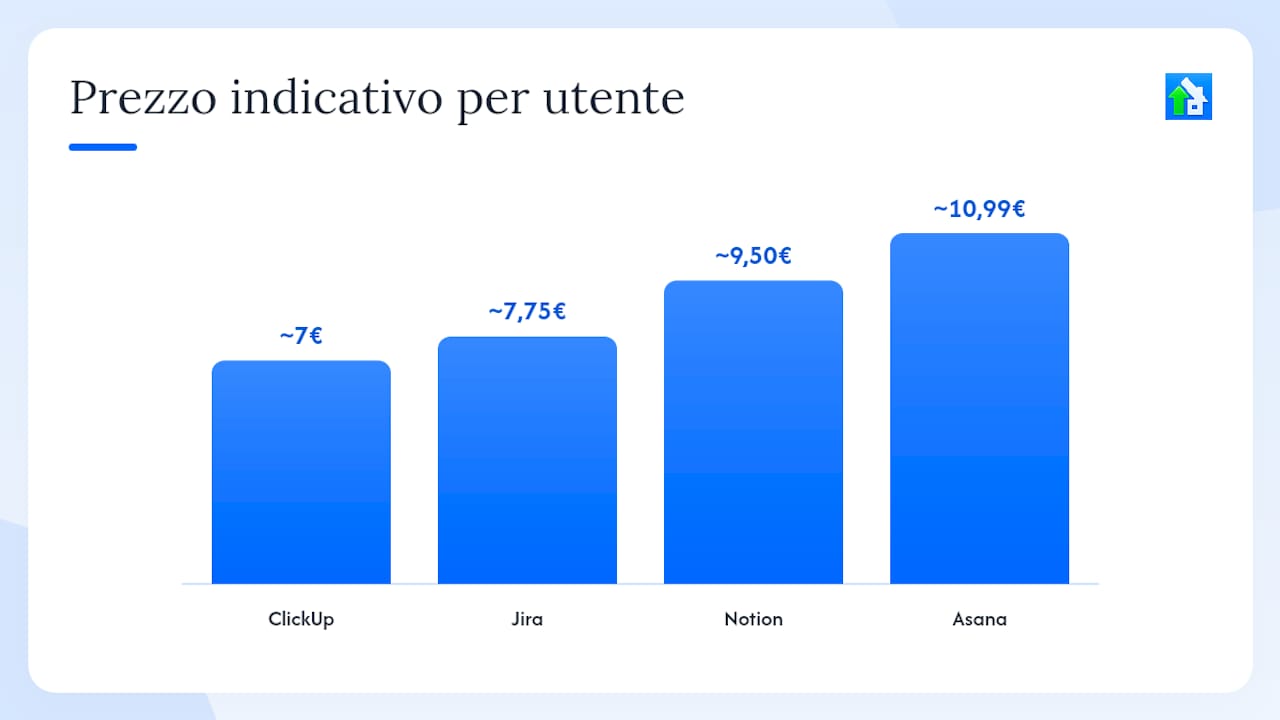
| Tool | Best for | Free plan | Indicative price (paid) | Available views | Automation/templates | Main integrations | Trello import | Italian support | Security/backup |
|---|---|---|---|---|---|---|---|---|---|
| Asana | Mid-sized teams, marketing, ops | Yes (up to 10 users) | From ~€10.99/user/month | Kanban, list, timeline, calendar | Yes, advanced rules | Google WS, Microsoft, Slack, Zapier | Yes (CSV/JSON) | IT interface, EN support | SOC 2, automatic backup |
| ClickUp | Versatile teams, SMBs | Yes (unlimited users) | From ~€7/user/month | Kanban, Gantt, table, calendar, map | Yes, extensive | Google WS, Microsoft, Slack, Zapier | Yes (native) | Partial IT interface | SOC 2, encryption |
| Jira | Development teams, agile | Yes (up to 10 users) | From ~€7.75/user/month | Kanban, Scrum board, backlog, roadmap | Yes (advanced automation) | GitHub, Confluence, Slack, Zapier | Yes (CSV) | IT interface, EN support | SOC 2, ISO 27001 |
| Notion | Documentation + tasks | Yes (personal use) | From ~€9.50/user/month | Kanban, table, calendar, gallery | Limited (databases) | Slack, Google Drive, Zapier | Limited (CSV) | IT interface | Encryption, backup |
| monday.com | SMBs, marketing, ops | No (trial only) | From ~€9/user/month | Kanban, Gantt, calendar, table, map | Yes, highly flexible | Google WS, Microsoft, Slack, Zapier | Yes (CSV/Excel) | IT interface, IT support | ISO 27001, SOC 2 |
| Airtable | Structured data, ops | Yes (limited) | From ~€10/user/month | Grid, kanban, calendar, gallery, Gantt | Yes (automation) | Google WS, Slack, Zapier | Yes (CSV) | Partial EN/IT interface | SOC 2, backup |
| Wrike | Large teams, agencies | Yes (up to 5 users) | From ~€9.80/user/month | Kanban, Gantt, table, calendar | Yes, advanced | Google WS, Microsoft, Slack, Salesforce | Yes (CSV) | IT interface, EN support | ISO 27001, SOC 2 |
| Smartsheet | SMBs, construction, finance | No (trial only) | From ~€9/user/month | Grid, Gantt, kanban, calendar | Yes, advanced | Google WS, Microsoft, Slack, Zapier | Yes (CSV/Excel) | Partial IT interface | SOC 2, ISO 27001 |
| Basecamp | Small teams, communication | No (trial only) | $299/month (flat) | List, message board | Limited | Email, Zapier | Limited | EN interface | Automatic backup |
| Freedcamp | Freelancers, small teams | Yes (unlimited projects) | From ~$1.49/user/month | Kanban, Gantt (paid), calendar | Limited | Google Drive, Zapier | Yes (CSV) | EN interface | Backup, encryption |
| Microsoft Planner | Microsoft 365 teams | Yes (with M365) | Included in M365 | Kanban, grid, calendar | Limited (Power Automate) | Teams, SharePoint, Outlook | No (manual) | IT interface | Microsoft compliance |
| Edil-up | Job sites, construction, construction SMBs | Yes (basic features) | Annual Plus plan | Kanban, progress monitoring | Yes (job-site workflows) | Integrated job postings, job-site docs | N/A (vertical) | IT interface, IT support | Backup, GDPR |
Learning curve: Freedcamp and Microsoft Planner are the most immediately accessible. ClickUp and Airtable require initial configuration. Jira has the steepest learning curve, especially for non-technical teams.
Detailed profiles: what each tool offers (and where it falls short)
The aggregated reviews on Capterra show recurring patterns: users appreciate the flexibility of the views, but often point to configuration complexity as a barrier to adoption. Here is what to know about each tool before choosing.
Asana
Asana is the most mature choice for teams managing structured workflows with task dependencies. Its timeline view is among the most intuitive in the category, and its automation rules cover most use cases without requiring code.
Best for: marketing, operations, mid-sized teams (10–50 people).
Strengths: clear visual timeline, rule-based automation, native integrations with Google Workspace and Microsoft 365.
Limitations: the free plan excludes timelines and automation; advanced reporting is reserved for higher-tier plans; the learning curve increases with complex workflows.
Price: free for up to 10 users (basic features); paid plans from approximately €10.99/user/month.
Trello import: yes, via CSV or third-party tools.
ClickUp
ClickUp is probably the most configurable tool on the list. It supports almost every project-management methodology, from kanban to OKRs, and its free plan is among the most generous in terms of users and features. The downside is complexity: without careful initial setup, the platform can become chaotic.
Best for: versatile SMBs, teams that want one tool for everything.
Strengths: multiple views (more than 15), extensive automation, native import from Trello.
Limitations: dense interface, lengthy onboarding for non-technical teams, some advanced features available only on paid plans.
Price: free (unlimited users, limited storage); plans from approximately €7/user/month.
Jira
Jira is the de facto standard for software development teams working with agile methodologies. Backlogs, sprints, roadmaps, and integrations with GitHub or Bitbucket are difficult to match. For non-technical teams, however, the interface can be over-engineered.
Best for: software development, agile teams, DevOps.
Strengths: sprint and backlog management, advanced automation, Atlassian ecosystem (Confluence, Bitbucket).
Limitations: steep learning curve, complex configuration, less suitable for non-technical teams.
Price: free for up to 10 users; plans from approximately €7.75/user/month.
Trello import: yes, via CSV; Atlassian provides an official migration guide.
Notion
Notion is not a project management tool in the strict sense: it is a hybrid workspace combining documentation, databases, and kanban. It works well for teams that want to centralise notes, wikis, and tasks in one place. Automation remains limited compared with Asana or ClickUp, and the direct comparison with Trello shows that Notion excels at content management, not structured planning.
Best for: creative teams, start-ups, knowledge workers.
Strengths: database flexibility, integrated documentation, clean interface.
Limitations: limited automation, restricted Trello import, not suitable for Gantt charts or complex dependencies.
Price: free (personal use); team plans from approximately €9.50/user/month.
monday.com
monday.com focuses on visual simplicity and rapid customisation. Templates cover dozens of use cases, from marketing campaigns to product launches, and automation can be configured without code. The absence of a permanent free plan is the main limitation for anyone wanting to test it without commitment.
Best for: SMBs, marketing, sales teams.
Strengths: ready-to-use templates, flexible automation, visual dashboards.
Limitations: no permanent free plan, high cost for large teams, some integrations available only on higher-tier plans.
Price: free trial; plans from approximately €9/user/month (minimum 3 users).
Airtable
Airtable sits midway between an advanced spreadsheet and a relational database with kanban views. It is the right choice for people managing complex structured data (inventories, catalogues, pipelines) who want to visualise it in different ways. It is not designed for traditional project planning.
Best for: operations, data management, teams working with structured datasets.
Strengths: relational database, multiple views, native automation.
Limitations: medium-to-steep learning curve, free plan limited by record count, less suitable for Gantt charts or timelines.
Price: free (limited); plans from approximately €10/user/month.
Wrike
Wrike is aimed at medium-sized and large teams and agencies managing multiple projects in parallel with detailed reporting needs. Its resource-management features and customisable dashboards set it apart from simpler competitors.
Best for: agencies, large teams, portfolio management.
Strengths: interactive Gantt, resource management, advanced reports.
Limitations: free plan limited to 5 users, complex interface, high cost for advanced features.
Price: free for up to 5 users; plans from approximately €9.80/user/month.
Smartsheet
Smartsheet uses an Excel-like grid interface, making it immediately familiar to people who work with spreadsheets. It supports Gantt charts, automation, and integrations with Microsoft 365, and is used in sectors such as construction, finance, and manufacturing.
Best for: SMBs with structured processes, construction, finance.
Strengths: familiar grid interface, robust Gantt, Microsoft integrations.
Limitations: no permanent free plan, less flexible for agile methodologies, high cost for large teams.
Price: free trial; plans from approximately €9/user/month.
Basecamp
Basecamp prioritises communication over task management. Messages, boards, automatic check-ins, and to-do lists are combined in one clean interface. Its flat pricing model (a fixed monthly price regardless of the number of users) makes it cost-effective for large teams.
Best for: small teams, agencies, internal communication.
Strengths: flat pricing, simple interface, centralised communication.
Limitations: limited project-management features, no native Gantt, poor Trello import.
Price: $299/month (unlimited users); no permanent free plan.
Freedcamp
Freedcamp is among the free alternatives most often mentioned in communities by people seeking a Trello replacement without spending money. The free plan includes unlimited projects and users, which is unusual in the sector. Advanced features (Gantt, timesheets, billing) require an upgrade.
Best for: freelancers, small teams, anyone seeking maximum value for free.
Strengths: generous free plan, unlimited projects, simple interface.
Limitations: Gantt available only on paid plans, limited integrations, English-language interface.
Price: free; plans from approximately $1.49/user/month.
Microsoft Planner
Microsoft Planner is the natural choice for people already using Microsoft 365. It integrates natively with Teams, SharePoint, and Outlook without additional configuration. It does not have a robust native Gantt chart, but for teams operating within the Microsoft ecosystem, it is difficult to find a smoother alternative.
Best for: Microsoft 365 teams, public administration, large companies.
Strengths: native M365 integration, simple interface, included in the subscription.
Limitations: limited features outside the Microsoft ecosystem, no direct Trello import, automation only through Power Automate.
Price: included in Microsoft 365 (from approximately €6/user/month).
Edil-up
Edil-up is not a generic kanban adapted to construction: it is a platform built around the real processes of a job site. Document management, work-progress monitoring, job postings to find collaborators, and environmental-sustainability metrics coexist in one environment designed for construction companies, tradespeople, and technical firms in Italy. For those managing contracts with subcontractors, regulatory deadlines, and job-site documentation, a vertical solution such as Edil-up measurably reduces delivery times, without having to adapt a generic tool to processes it was never designed to handle. Learning curve: low for people familiar with job-site processes.
How to choose the right Trello alternative for your team
The choice depends on five practical variables. Answering these questions before testing any tool reduces the risk of adopting a platform that works well in a demo but breaks down in real life.
- Do you need reporting, timesheets, or cost control? For teams managing contracts or budgets, a solution integrating timesheets and financial reports is worth far more than pure kanban. This applies particularly to job sites, agencies, and professional firms.
One piece of advice: measure ROI at 3 months using three simple metrics: average time to complete a task, number of weekly alignment meetings, and deadline-compliance rate. If none of the three has improved after 90 days, the tool is not the problem, but the process is. When your work revolves around job sites, contracts, or construction processes, choose a vertical solution such as Edil-up instead of forcing a generic tool to fit: the savings in configuration and adaptation alone justify the subscription cost.
How to migrate from Trello without losing data
Migrating from Trello is less complicated than it may seem, but it requires a precise plan. Skipping post-migration checks is the main cause of data loss or broken automation.
Export and preparation phase
- Export your data from Trello in JSON format. Go to the board settings, select “Export JSON”, and download the file. This format contains cards, comments, checklists, attachments, and metadata. Always keep a copy before proceeding.
- Map the fields between Trello and the new platform. Trello lists become columns or sections; cards become tasks or records; labels become tags or categories. Each tool has a different structure: check the mapping before importing.
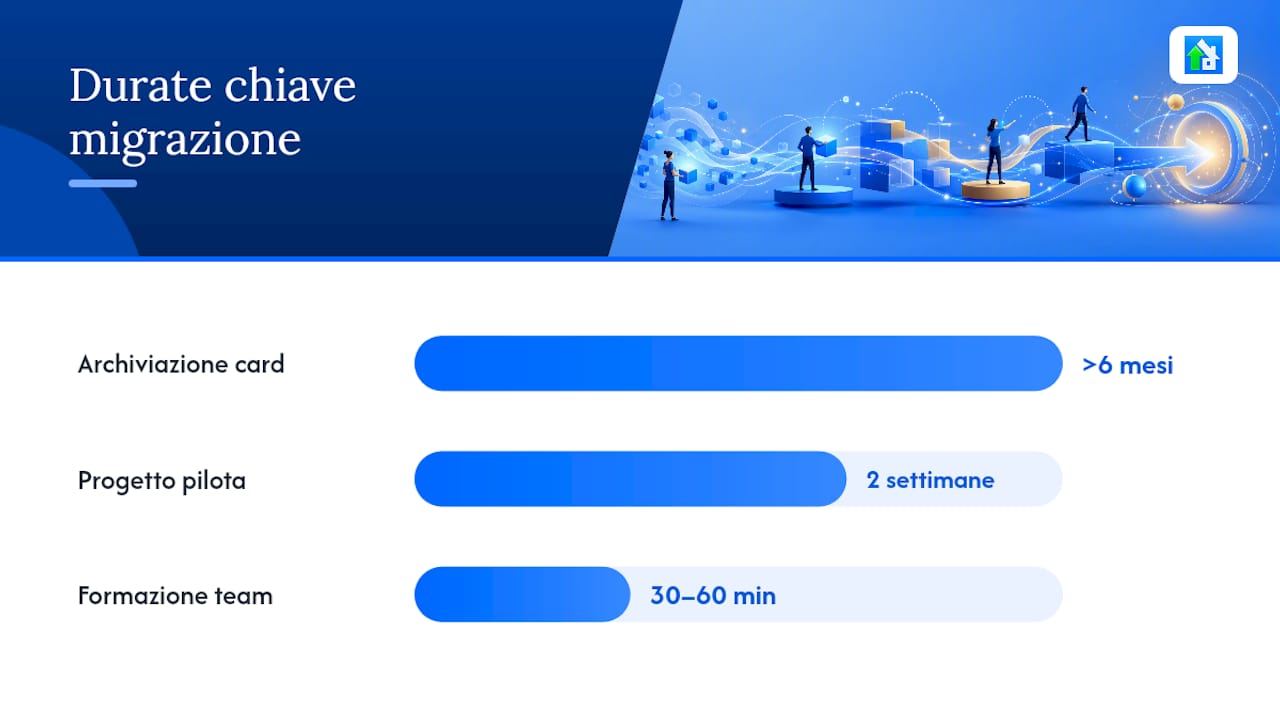
- Decide what to import. Not everything is worth migrating. Archive cards closed more than 6 months ago, remove duplicate attachments, and clean up unused labels. A clean migration is more useful than a complete one.
Import and verification phase
- Import into the new platform. Most tools (ClickUp, Asana, monday.com) offer native Trello import via JSON or CSV. Follow the official documentation for the tool you choose to avoid encoding errors or missing fields.
- Recreate automations and webhooks. Trello automations (Butler) do not migrate automatically: you will need to recreate them in the new platform. List all active rules before starting and reproduce them one by one.
- Test with a pilot project. Do not migrate everything at once. Choose an active but non-critical board, migrate it, and let the team use it for two weeks before proceeding with the rest.
Essential post-migration checks
- Verify that user permissions are correct (who can view, edit, and delete).
- Check that integrations with Slack, Google Drive, or other tools work correctly.
- Confirm that automatic backups are active on the new platform.
- Schedule a short training session (30–60 minutes) for the team, focusing on differences from Trello rather than teaching the tool from scratch.
Why Edil-up is different from generic kanban for people working on job sites
A marketing team can adapt Asana or ClickUp to its processes in a few days. A construction company managing job sites, subcontractors, regulatory documentation, and work progress has needs that no generic kanban covers natively.
Edil-up is designed around the real life cycle of a job site: from publishing job postings to find qualified collaborators, to monitoring progress by contract, through document management and calculating the environmental impact of digitised projects. For every active subscription, the platform plants trees, making the sustainability component measurable as well.
The practical benefits for people working in construction:
- Progress monitoring by contract: — not just completed tasks, but the actual completion percentage for each project phase, with reporting for the client or project management.
For those managing multiple job sites in parallel, centralised project management reduces coordination errors and delays. Edil-up is associated with a significant reduction in delivery times for companies adopting the platform. Learning more about how digitalisation is changing the construction sector helps explain why a vertical tool makes a difference compared with an adapted kanban.
Edil-up: the platform for people managing job sites, not just tasks
The general-purpose alternatives covered in this guide are excellent tools for marketing, development, or operations teams. But if you work in construction, manage subcontractors, track progress across multiple job sites, and need regulatory documentation close at hand, none of those tools was designed for you.
Edil-up is built around the real processes of the sector: progress monitoring by contract, job-site document management, publishing job postings to find qualified collaborators, and integrated sustainability metrics. The Plus plan includes all advanced features with Italian-language support. For every active subscription, Edil-up plants trees, making the environmental component of digitalisation tangible.
Visit edil-up.com/pricing to see the available plans, or contact the sales team for a demo tailored to your company.
Useful sources and official documentation
To verify technical details, free-plan limits, and migration procedures, these resources are the most reliable starting point.
- The 18 best Trello alternatives for 2026 (Kinsta) — updated overview with a feature comparison and annotated shortlist.
- Top 15 Trello alternatives (Capterra Italia) — aggregated user reviews with ratings for ease of use and support.
- Trello vs Notion: 2025 comparison (Appvizer) — analysis of differences in views and free plans.
- Free Trello alternatives: community discussion (Reddit r/trello) — real migration experiences and practical issues not officially documented.
- Trello user reviews on Capterra — detailed feedback on performance, support, and ease of use.
- Project management with Zelo ERP (Entersys) — example of a vertical solution with kanban, timesheets, and integrated analytical accounting.
To verify free-plan limits, always consult the official pricing page for the tool you choose: plans change frequently, and third-party comparisons may not be up to date. For migration procedures from Trello, each platform’s official documentation (Asana, ClickUp, monday.com) includes step-by-step guides with updated screenshots.