
Effective digital construction-site access management can be achieved in three moves: define Doc Needs (the list of documents required for each role and activity), configure roles and permissions on a centralised platform, and enable an audit trail with electronic signatures compliant with UNI/PdR 168:2024, which came into force on 26 September 2024. Without these three pillars, digitalisation remains a superficial exercise.
- Step 1: define Doc Needs and roles before changing any technical settings.
- Step 2: activate access controls, approval workflows and automatic notifications for expiring documents.
- Step 3: enable audit logs and legally compliant preservation with metadata and advanced electronic signatures.
One tip: run a pilot on a single construction site with two subcontractors. Validate the workflows in three weeks, then scale up. Starting with the entire site portfolio is the fastest way to trigger resistance.
Key points
Effective digital construction-site access management requires defined Doc Needs, configured roles, an immutable audit trail and legally compliant preservation integrated into the approval workflow.
| Point | Details |
|---|---|
| Reference standard | UNI/PdR 168:2024 requires traceability, metadata and advanced electronic signatures for safety documents. |
| Three minimum steps | Define Doc Needs and roles, activate approval workflows, enable audit and legally compliant preservation. |
| Pilot before rollout | Start on one construction site with two subcontractors to validate workflows in 3–4 weeks. |
| KPIs to measure | Average document approval time, percentage of documents digitally validated, reduction in travel. |
| Edil-up | Covers Doc Needs, electronic signatures, audit trail and mobile access in a single construction platform. |
Contents
- Why digital access management is now necessary, not merely convenient
- What functionality the platform must have: technical checklist
- How to structure roles and permissions: responsibility matrix
- How to invite subcontractors and configure approval workflows
- How to organise documents, metadata and compliant preservation
- What to record in the audit trail and how to use it for compliance
- Security and GDPR: what to check before rollout
- Implementation checklist: stages, timing and costs
- How Edil-up meets the requirements: functional mapping
- Get started with Edil-up: site access management on one platform
- Sources
Why digital access management is now necessary, not merely convenient
UNI/PdR 168:2024 has changed the rules: digitising health and safety documentation is no longer an organisational choice but a requirement with legal implications. The practice requires traceability, metadata preservation and advanced electronic signatures to guarantee the evidential value of site documents. AGID guidelines complete the framework by defining standards for legally compliant digital preservation.
The operational benefits are tangible. Structured document control with version control, access control and approval workflows reduces errors, delays and rework. Fewer trips to deliver or collect paper documents, no ambiguity about which version is valid, and an archive that can be searched in seconds rather than hours.
The risks of not adopting a digital system are equally tangible:
- Duplication of documents with uncontrolled parallel versions circulating via email or personal clouds.
- Version errors that lead personnel to work from obsolete drawings or procedures.
- Compliance gaps detected only during an inspection, when it is too late to remedy them.
What functionality the platform must have: technical checklist
The five decisive capabilities for AEC projects are version control, role-based access, mobile and offline access, markup with synchronised annotations, and an audit trail. Field access is often the factor that determines real adoption: if the foreman cannot open the current document from the site, the system fails when it matters most.
Mandatory functionality (must-have):
- Definition of Doc Needs by role and activity, with templates and deadlines.
- Configurable hierarchical roles (Manager, Supervisor, General Contractor, Company, Worker).
- Folder- and document-level permissions, with inheritance and granular overrides.
- Approval workflows with traceable statuses (draft, under review, approved, revoked).
- Advanced electronic signature with legal validity compliant with current legislation.
- Immutable audit log with timestamp, user, action and document version.
- Structured metadata and full-text search.
- Mobile access with offline mode and automatic synchronisation.
- Legally compliant preservation integrated into the document lifecycle.
Useful but non-blocking functionality (nice-to-have): native integrations with ERP and BIM, collaborative markup and annotations, project KPI dashboards.
One tip: in an RFP or during a demo, explicitly ask how the platform handles automatic access revocation at the end of an assignment and how it exports logs for an inspection. Vague answers on these two points signal real gaps.
How to structure roles and permissions: responsibility matrix
Construction document systems combine permissions when a user holds multiple roles: a Supervisor who also acts as the safety contact receives the combined privileges of both profiles. This behaviour, documented on platforms such as Autodesk Vault, must be considered during configuration to avoid unintended privilege escalation.
| Role | View | Upload | Edit | Approve | Manage permissions |
|---|---|---|---|---|---|
| Manager | ✓ | ✓ | ✓ | ✓ | ✓ |
| Supervisor | ✓ | ✓ | ✓ | ✓ | ✗ |
| General Contractor | ✓ | ✓ | ✗ | ✗ | ✗ |
| Subcontractor Company | ✓ | ✓ | ✗ | ✗ | ✗ |
| Worker | ✓ | ✗ | ✗ | ✗ | ✗ |
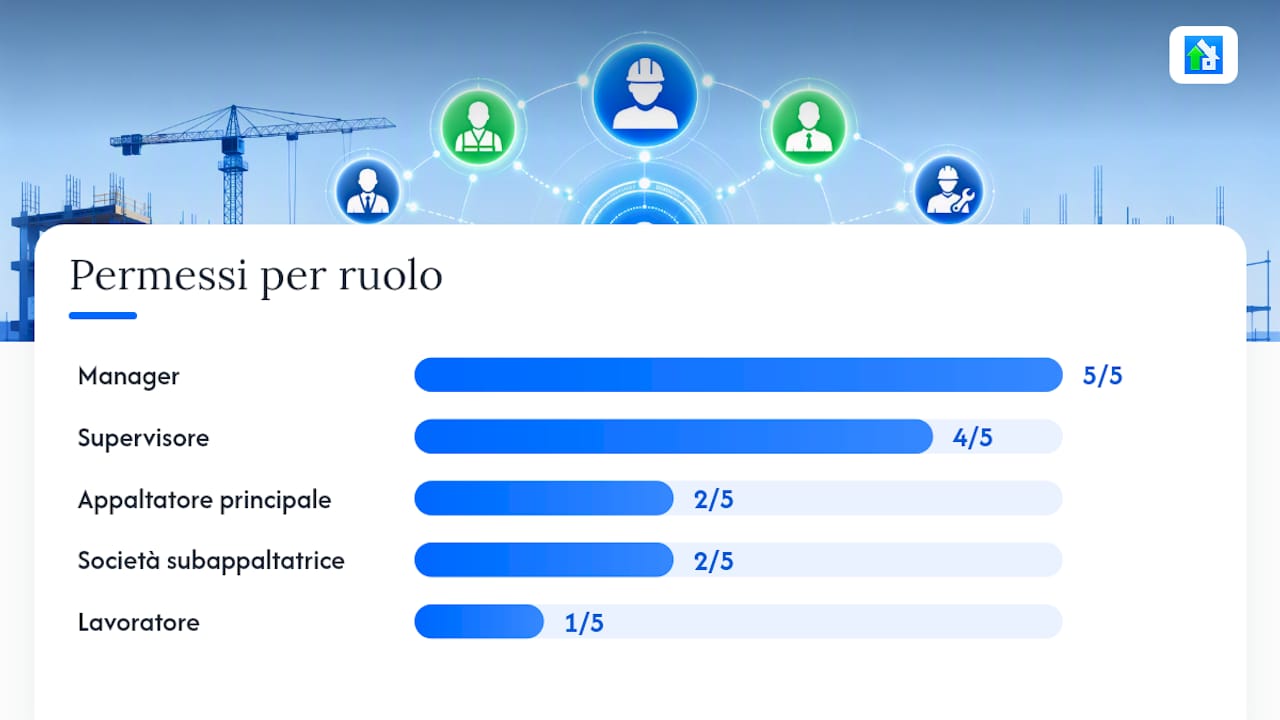
The folder hierarchies in ProjectWise show how permissions are inherited down the hierarchy and can be overridden at lower levels, with each change recorded in the audit trail through concise codes. This principle applies to any well-designed platform.
One tip: configure permissions at project-folder level and let documents inherit them. Override them only for specific exceptions. Managing each document individually is unsustainable on sites with hundreds of files.
How to invite subcontractors and configure approval workflows
A single repository with scheduled external sharing reduces the risk of files leaving your control via email or personal clouds. Onboarding a new company follows a precise sequence:
- The Manager creates the company profile on the platform and assigns the correct role.
- The system sends an email invitation with an access link and first-login instructions.
- The company uploads the documents required by the Doc Needs (company registration extract, DURC, safety plan, certificates).
- The Supervisor checks completeness and starts the approval workflow.
- The platform automatically updates the status and enables access to site resources.
- At the end of the assignment, the system revokes access according to the configured expiry date.
The automations that make a difference in everyday practice:
- Automatic notifications for expiring documents, with configurable advance notice (e.g. 30 and 7 days beforehand).
- Automatic access block if a mandatory document expires without renewal.
- Alert to the Manager for approvals pending for more than N days.
How to organise documents, metadata and compliant preservation
The folder structure must reflect the project lifecycle, not the company organisation chart. An effective hierarchy starts with the construction site, moves down to the phase (design, execution, testing) and then to the document type. File names follow a fixed convention: [ProjectCode]_[DocType]_[Revision]_[Date].
Structured metadata makes it possible to filter by document type, phase, person responsible and expiry without manually navigating folders. This is the real leap forward from paper-based management: a document can be found in three seconds even by someone unfamiliar with the folder structure.
| Metadata | Example values | Practical use |
|---|---|---|
| Document type | Safety plan, DURC, Construction drawing | Category filter |
| Project phase | Design, Execution, Testing | Progress filter |
| Status | Draft, Under review, Approved | Workflow filter |
| Expiry | ISO date (e.g. 2026) | Automatic alerts |
| Responsible person | User name or role | Assignment and accountability |
Legally compliant preservation requires every approved document to be archived with an advanced electronic signature and immutable legal metadata, in line with UNI/PdR 168:2024 and AGID requirements. Preservation is not a separate operation: it must be integrated into the approval workflow so that every approved document is automatically sent to the compliant archive.

One tip: do not postpone metadata configuration until after the pilot. Adding metadata retrospectively to hundreds of already uploaded documents is manual work that nobody will do.
What to record in the audit trail and how to use it for compliance
A log useful for an inspection or dispute must contain at least these events:
- Document access (user, timestamp, device/IP).
- Download and printing (who, when, which version).
- Upload and version replacement.
- Application of an electronic signature.
- Permission changes (who changed what, for which user).
- Approval or rejection in the workflow.
| Log field | Example | Why it matters |
|---|---|---|
| User ID | mario.rossi@impresa.it | Identifies the responsible person |
| Action | APPROVE | Event type |
| Timestamp | 2026 | Definitive chronological order |
| Document ID + version | PSC_v3.pdf | Which file, which revision |
| IP / device | IP address / iOS | Access context |
For an inspection, export the log filtered by document or user in CSV or signed PDF format. To reconstruct the approval chain for a specific document, filter by document ID and sort by timestamp: every status change is visible with the responsible person and exact time.
Security and GDPR: what to check before rollout
Mandatory technical controls:
- Encryption of data at rest (AES-256) and in transit (TLS 1.2 or higher).
- Multi-factor authentication for all users with access to sensitive data.
- Immutable access logs that cannot be modified, even by the administrator.
- Automatic backups with documented Recovery Point Objective (RPO) and Recovery Time Objective (RTO).
- A disaster recovery plan tested at least once a year.
Process controls:
- Enter into a data processing agreement (DPA) with the cloud provider before activation.
- Define retention policies for each document category (e.g. safety documents: 10 years).
- Document procedures for responding to data-subject access requests within 30 days.
- Verify data residency: for Italian public projects, prefer data centres in the EU.
- Update the company processing register to include the new platform.
Implementation checklist: stages, timing and costs
- Requirements assessment (weeks 1–2): map Doc Needs for a typical site, define roles and interview site managers about current workflows.
- Supplier selection (weeks 3–4): RFP covering must-have functionality, demo with real scenarios, GDPR and SLA review.
- Pilot (weeks 5–8): one site, two subcontractors, complete flow from invitation to approval. Measure average document approval time as the main KPI.
- Training (weeks 7–9, alongside the pilot): short role-based sessions (30 minutes), with quick-reference material accessible on mobile.
- Extended rollout (months 3–4): extend to all active sites, integrating with ERP if planned.
- KPI monitoring (month 5 onwards): percentage of documents digitally validated, reduction in administrative travel, average subcontractor onboarding time.
The main cost factors to consider are licences per user or site, ERP and BIM integrations (often the largest item), workflow customisation, long-term legally compliant preservation and training for site personnel.
How Edil-up meets the requirements: functional mapping
Edil-up includes the Armadietto module for centralised document management. The table shows how regulatory and operational requirements translate into concrete controls on the platform.
| Requirement | Control in Edil-up |
|---|---|
| Doc Needs per subcontractor | Configurable document templates by role and site |
| Advanced electronic signature | Integrated signature with legal validity compliant with UNI/PdR 168:2024 |
| Audit trail | Real-time event log with user, action and timestamp |
| Mobile access | Mobile app with site access, including areas with limited connectivity |
| Expiry notifications | Automatic alerts for expiring or missing documents |
| Legally compliant preservation | Archiving with immutable metadata integrated into the workflow |
| Role management | Hierarchical structure of Manager, Supervisor, Company, Worker |
A typical use case: a Manager activates Doc Needs for a new subcontractor, the platform sends the invitation, the company uploads the required documents, the Supervisor approves them and access to site resources is enabled automatically. The entire flow is tracked and can be consulted at any time.
For more information on construction-site document management and integrated attendance tracking, Edil-up’s dedicated guides provide additional technical details and use cases.
The practical advice nobody gives you
The most common mistake I see in implementations is digitally replicating the existing paper structure, folder by folder, without taking advantage of metadata and automation. The result is a digital archive as disorganised as the physical one, with the added cost of a software licence.
Role-based micro-training directly on site, using real scenarios, works much better. Fifteen minutes on “how to upload and sign a document” are worth more than three hours of theory.
The approach that produces results is iterative: improve one process at a time, measure it, then move on to the next. Do not replace everything at once.
Get started with Edil-up: site access management on one platform
Anyone managing sites with multiple subcontractors knows that the real bottleneck is not signing the contract: it is the time lost chasing missing documents, obsolete versions and blocked authorisations. Edil-up solves this problem with a centralised system covering Doc Needs, electronic signatures, audit trail and mobile access in a single platform designed for construction.
The concrete advantage over generic solutions: Edil-up is built around real site workflows, with hierarchical roles already configured for the sector and an Armadietto module that manages documentation from request through legally compliant preservation. No starting-from-scratch customisation and no external consultant needed to adapt a generic CRM to a construction company’s needs.
Start with a measurable pilot: define one KPI (e.g. average document approval time), activate Edil-up on one site for 30 days and compare the results. Consult the pricing plan or discover how digitalisation is changing processes to assess the return before scaling up.
Sources
- Construction Document Control for AEC Firms | Egnyte
- ProjectWise Explorer – Folder and document permissions – Bentley
This article provides general information and does not replace advice from a qualified lawyer. Consult a qualified legal professional about your specific circumstances before acting on this content.