
Digital construction accounting is the real-time management of jobsite accounting and project financial monitoring through SaaS platforms that replace Excel spreadsheets and paper archives. For Italian construction companies and subcontractors managing multiple jobsites simultaneously, the most direct solution is Edil-up, which reports delivery-time reductions of up to 20% for customers adopting the platform. The system covers the work log, SAL progress, document management, and compliance with the Sistema di Interscambio (SDI) and GDPR, all in one environment accessible from the jobsite.
Key points
Digital construction accounting reduces delivery times, improves margin control, and ensures compliance with Italian regulations when the platform covers SAL, SDI export, GDPR, and integration with the accountant.
| Point | Details |
|---|---|
| Start with an Excel audit | Map current cost items before importing them: overly aggregated categories make variances impossible to read. |
| Implementation in 1–2 weeks | Data import, dual entry, and foreman training (2–3 hours) are enough for the cutover. |
| ROI in 3–6 months | Compare the monthly subscription with the hours saved on data reconciliation and delivery delays. |
| Mandatory Italian compliance | Verify native SDI export, AgID-compliant digital preservation, and GDPR data management before signing. |
| Edil-up as the direct solution | Covers the work log, SAL, document management, and sustainability, and reports delivery-time reductions of up to 20%. |
Contents
- What benefits does digital construction accounting bring to the jobsite?
- What features are essential in a construction accounting platform?
- How is a SaaS solution implemented in Italy: timing, costs, and expected ROI
- What integrations and regulatory requirements are needed to operate in Italy?
- How to evaluate a platform during the demo: questions, tests, and warning signs
- How Edil-up covers digital construction accounting in practice
- Useful resources for further information
- The accounting digitalization no one wants to do, but everyone must do
- Edil-up: the starting point for anyone who truly wants to control jobsite costs
- Sources
What benefits does digital construction accounting bring to the jobsite?
Moving to digital accounting management is not just about being organized. The benefits can be measured on three distinct levels.
Real-time financial control. With a professional system, the estimate and the actual costs are compared every time an entry is made, rather than at the end of the month.
Multi-jobsite visibility. A centralized dashboard shows the financial status of all active jobsites at a glance. This type of centralized project management eliminates the need to open ten different files to understand where margin is being lost.
Less paper and lower environmental impact. Fewer printouts, fewer paper DDTs, and fewer physical archives. Edil-up goes further: it calculates the environmental savings generated by digitalized projects and plants trees for every active subscription.
The most relevant operational benefits for those managing jobsites in Italy include:
- Real-time estimate-versus-actual comparison, with variance projections visible before project closeout
- Configurable alerts at budget thresholds (80% and 100%) for each jobsite or cost item
- Mobile cost entry directly from the jobsite, with no manual office steps
- Delivery-time reductions of up to 20%, according to data reported by Edil-up
- Elimination of duplicate files and outdated versions, a documented problem in companies using Excel across more than 2–3 jobsites
A tip: Before choosing a platform, measure how much time your team spends each week reconciling data between different Excel files. That number is your starting point for calculating ROI.
What features are essential in a construction accounting platform?
An effective platform for digital jobsite accounting management must cover at least six functional areas. Missing even one creates gaps in financial control.
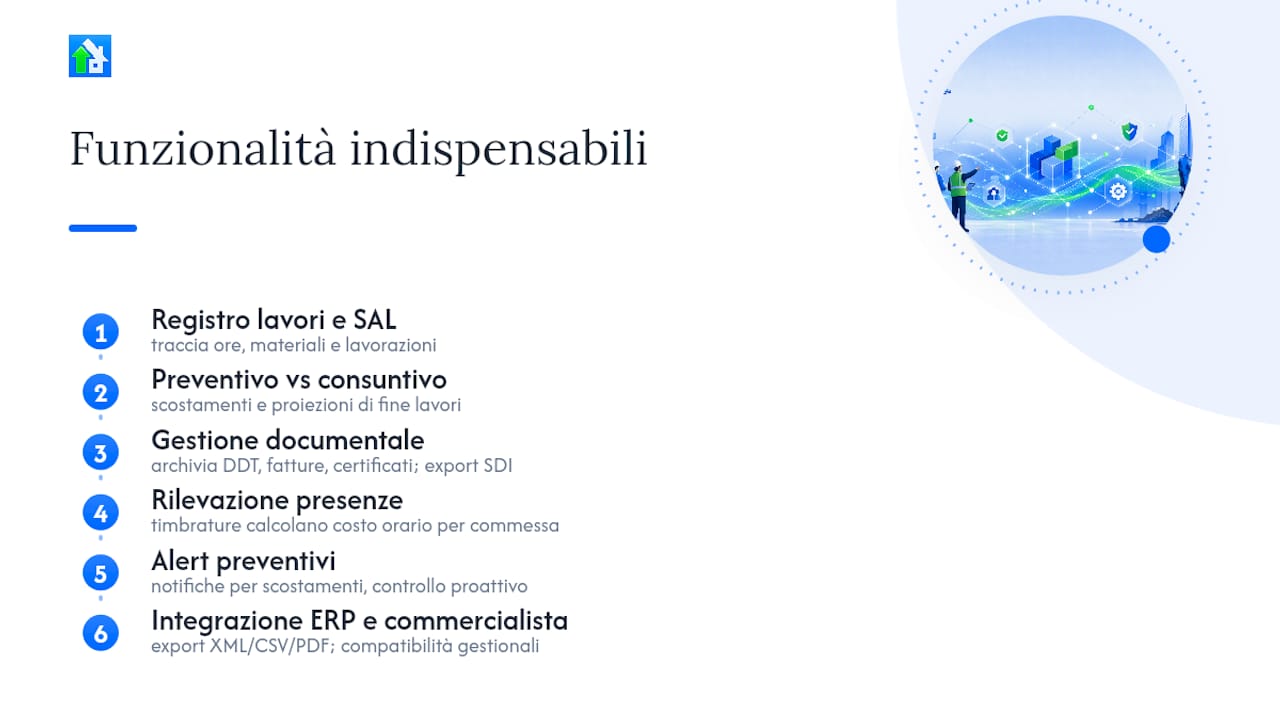
Work log and SAL. The core of the system: tracking hours, materials, and work performed for each phase. Linking physical progress to financial tracking is what turns a simple jobsite diary into a cost-control tool. Edil-up’s guide to progress monitoring explains how to integrate SAL and financial reporting operationally.
Estimate versus actual costs with projections. Recording costs is not enough: at every moment, you need to see how far costs are deviating from the estimate and where they will end up if the trend continues. This is the function that protects margins.
Integrated document management. DDTs, electronic invoices, and certificates of conformity must all be archived, searchable, and linked to the job. Export in a format compatible with the Sistema di Interscambio (SDI) is mandatory for electronic invoicing in Italy.
Attendance and labor-cost tracking. Jobsite time punches must automatically feed the calculation of the hourly cost for each job. Jobsite attendance tracking is one of the areas where companies lose the most data when the process is not integrated.
Without alerts, control becomes reactive rather than preventive.
Integration with the accountant and ERP. Export in standard formats (XML, CSV, PDF), compatibility with major accounting management systems, and the ability to share data with the accountant without manual reworking.
A tip: Map the cost items in your standard estimate before importing them into the system. If you use overly aggregated categories (for example, “construction work” as a single item), variances will be impossible to understand. At a minimum, separate labor, materials, equipment rentals, and subcontracts.
How is a SaaS solution implemented in Italy: timing, costs, and expected ROI
Moving from Excel to a professional system is more intimidating than it deserves to be. Excel becomes a real problem beyond 2–3 jobsites: duplicate files, broken formulas, and no single reliable version. Migration, by contrast, can be structured in four phases.
The four operational phases
- Initial data import (1–2 days): upload jobsite records, cost items, suppliers, and price lists. Most platforms accept imports from Excel or CSV.
- Dual-entry verification (1–2 weeks): continue recording in the old system as well to verify data consistency. This phase is the one most often skipped, resulting in errors at cutover.
- Foreman and administrative training (2–3 hours): modern SaaS platforms do not require lengthy courses. A practical session on entering costs, SAL, and generating reports is enough to get started.
- Cutover to the management system: close the old system and work only on the new platform, with active support from the provider during the first few weeks.
Pricing models and ROI estimate
| Model | Typical structure | Suitable for |
|---|---|---|
| Annual subscription per company | Fixed fee, unlimited users or user tiers | Companies with multiple active jobsites |
| Project plan | Cost per active job | Businesses with seasonal or intermittent work |
| Per-user plan | Monthly fee per seat | Professional firms and small teams |
To estimate break-even, calculate the platform’s monthly cost and compare it with the time saved each month (hours spent reconciling data, invoicing errors, and delivery delays). Details of the available plans can be found on Edil-up’s pricing page.
What integrations and regulatory requirements are needed to operate in Italy?
The Italian market has specific requirements that a construction accounting platform must meet to be usable without workarounds.
Electronic invoicing and SDI. Every solution must generate or export invoices in XML FatturaPA format compatible with the Sistema di Interscambio of the Agenzia delle Entrate. Without this feature, managing outgoing and incoming invoices remains manual.
Digital preservation of documents. Tax documents must be preserved in a format compliant with AgID specifications (PDF/A formats, XML with metadata). Verify that the platform supports substitute preservation or integrates with an accredited preservation provider.
GDPR and worker data. Time punches, attendance records, and employees’ personal data at the jobsite are personal data in every respect. The platform must ensure controlled access, operation logs, and the ability to export or delete data upon request.
Technical integrations to verify:
- Time punches and attendance tracking (integration with badges or mobile apps)
- Import/export of quantity takeoffs and BIM 5D (IFC, PriMus, Primus DCF formats)
- Supplier contact management and updatable price lists
- Jobsite supplier coordination with notifications and document sharing
- Export for the accountant in standard formats (XML, CSV, PDF)
How to evaluate a platform during the demo: questions, tests, and warning signs
A well-run demo is worth more than any technical datasheet. Here is how to structure it.
Questions you must ask
- Is XML export for SDI native, or does it require an additional paid module?
- How many active projects does the basic plan support without performance degradation?
- What is the Italian-language technical support SLA? Is phone support available, or only tickets?
- Does the Excel import preserve customized cost items, or normalize them into fixed categories?
- How are backups and data restoration handled in the event of an error?
Quick tests to run during the demo
- Simulate an SAL: enter partially completed work and verify that actual costs update in real time
- Record a materials purchase from a smartphone: assess how many taps are required and whether the interface is usable with gloves
- Generate an export for the accountant: check that the file is readable without reworking
Warning signs not to ignore
- Interface not optimized for mobile: the foreman does not work from a desktop
- No native SDI export, or export available only as PDF
- Technical support available only in a foreign language or only by email
- No configurable alerts for budget thresholds
- Inability to import historical Excel data without paid assistance
For a broader comparison of solutions, the guide on how to choose jobsite management software provides practical criteria and a detailed evaluation checklist.
How Edil-up covers digital construction accounting in practice
Edil-up is an Italian SaaS platform that covers the core functions of jobsite accounting and integrates them with networking and sustainability tools. The digital jobsite log guide published by Edil-up supports operational implementation step by step.

| Functional area | Edil-up coverage |
|---|---|
| Work log and SAL | Progress tracking linked to financial data for each job |
| Estimate versus actual costs | Real-time updates with variance projections |
| Document management | Storage of DDTs, invoices, and certificates with SDI export |
| Attendance tracking | Time-punch integration for labor-cost calculation |
| Multi-jobsite dashboard | Centralized visibility with alerts at configurable thresholds |
| Sustainability | Environmental savings calculation and tree planting for each active subscription |
Support and training. Edil-up provides support in Italian, with proprietary training materials and practical guides available directly on the platform. Basic training for a foreman can be completed in 2–3 hours.
For every active subscription, Edil-up plants trees and calculates the environmental savings generated by process digitalization.
Useful resources for further information
The resources below cover the main stages of the adoption process, from initial evaluation to operational implementation.
- Progress monitoring — an operational guide for linking SAL and financial accounting, useful during the demo phase
- Jobsite management software: how to choose — a comparative checklist for evaluating providers and features
- Jobsite attendance tracking — for integrating time punches and labor-cost calculation into construction accounting
Use these resources in the order shown: first the log and monitoring guides to understand what is needed, then the checklist to evaluate providers, and finally the pricing page when you are ready to compare plans.
The accounting digitalization no one wants to do, but everyone must do
There is a widespread misconception in the industry: many companies think digital construction accounting is a problem to address when they grow, not now. The reasoning is understandable. With two or three jobsites, Excel works well enough that it does not seem urgent. The problem is that the moment Excel stops working coincides exactly with the moment the company is under the most pressure: more open jobsites, more suppliers to coordinate, and less time to reconcile data.
The real question is not whether to digitalize, but when. Those who wait until they have a serious problem pay twice: they pay for the platform and for recovering historical data during a period of operational chaos.
These are two different things. General accounting is the accountant’s domain. Jobsite accounting is the real-time financial control of every job, item by item. A company can have an excellent accountant and lose margin on every job because no one monitors variances while work is underway.
The most counterintuitive advice is this: start with a pilot jobsite, measure KPIs at 30 and 90 days, then decide. Do not wait for the system to be perfect before starting. An imperfect system that works beats a perfect system that is never adopted.
Edil-up: the starting point for anyone who truly wants to control jobsite costs
Anyone managing jobsites in Italy knows that margin is lost in the details: an unrecorded cost item, a late SAL update, or an invoice that cannot be matched to the estimate. Edil-up is the platform that closes these gaps, with tools designed for the Italian construction sector rather than for a generic market.
The platform covers the work log, progress monitoring, document management with SDI export, and attendance tracking, all accessible from a mobile device at the jobsite. For every active subscription, Edil-up calculates environmental savings and plants trees: tangible sustainability, not just a claim.
Consult the digital jobsite log guide to learn how to structure your first pilot jobsite, or check the available plans on the pricing page to choose the model best suited to your company.
Sources
- How to Manage Jobsite Costs Without Excel: Practical Guide | Drilon Hametaj