
If you are considering changing tools, the short answer is this: the right choice depends on what is holding you back today. For multi-project portfolios with shared resources, you need platforms with capacity optimisation. For teams seeking simple collaboration, lighter tools are enough. For construction sites, Edil-up is the most suitable vertical option for the Italian market.
Quick shortlist by scenario:
- Complex portfolio and advanced planning: ClickUp or Wrike, with Gantt charts, dependencies and resource management.
- Cross-functional teams and collaboration: monday.com or Asana, with modern interfaces and robust integrations.
- Construction sites and the construction industry: Edil-up, a vertical platform with project monitoring, document management and environmental impact calculation.
There is also a deadline to keep in mind: Microsoft Project Online will be discontinued on 30 September 2026. Anyone still using that platform must start migrating now, not in September. More structured providers recommend allowing 3–6 months to validate data, train the team and complete the parallel-run period.
Contents
- Why are teams leaving Microsoft Project?
- How to choose the right alternative: criteria, questions and real costs
- What are the best Microsoft Project alternatives for 2026?
- Quick comparison: which tool does what?
- Why Edil-up is the recommended choice for construction sites
- Which alternative should you try first, based on your scenario?
- Key points
- Why modernise project management today, not six months from now
- Edil-up: the vertical platform for construction site managers
- Sources and resources for further reading
Why are teams leaving Microsoft Project?
The reasons are practical and recurring. This is not about aesthetic preferences.
- Cost and licensing model: Microsoft Project requires separate licences from Microsoft 365, with costs that quickly rise for larger teams.
- Steep learning curve: CPM planning logic is powerful but challenging for people without specific project management training.
- Desktop vs cloud architecture: the desktop version does not support real-time collaboration; the cloud version (Project Online) is being discontinued.
- Limited collaboration: .MPP files circulate by email, comments remain outside the plan and versions multiply.
- Weak integration with modern tools: limited native connectors to Slack, Teams (paradoxically), Jira or Italian ERP systems.
For construction sites, the problem is even more acute. Information silos between the technical office, site manager and subcontractors create duplication and delays. Centralising documentation and projects in a single workspace reduces decision times and cuts redundant communication, directly improving site productivity.
The market is moving towards tools that integrate artificial intelligence for risk analysis and real-time resource optimisation. Anyone considering a change today must include this dimension among the criteria, rather than treating it as an extra.
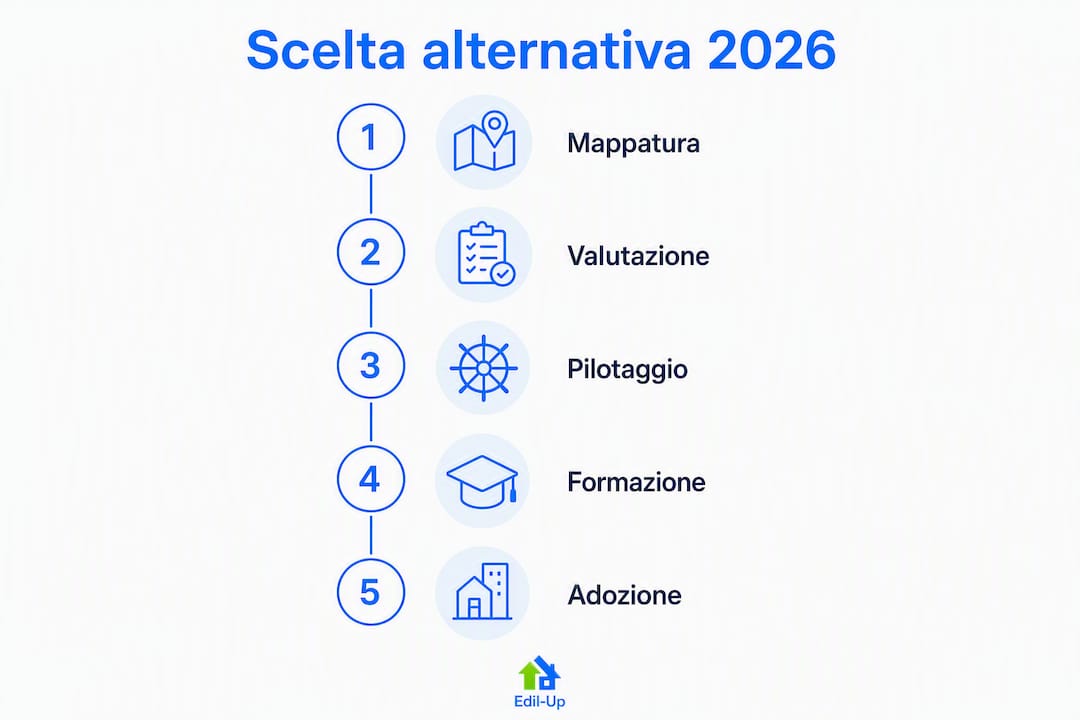
Advice: before choosing a tool, map stakeholders and governance processes. A migration is not just technical: it changes who sees what, who approves and who updates information. Involving site managers and project managers during the selection phase prevents resistance to change that no software can solve on its own.
How to choose the right alternative: criteria, questions and real costs
Functional criteria to evaluate
Not every solution on the market is a true replacement for MS Project. Some improve the user experience but do not replicate advanced planning functions such as complex dependencies, cost management or multi-project consolidation. The distinction between a functional replacement and a change in operating model is the first point to clarify.
- Gantt charts and planning: dependencies (FS, FF, SS, SF), critical path, baseline and variances.
- Resource management and levelling: allocation by project, overload detection and automatic levelling.
- Portfolio management: consolidated view across multiple projects, capacity analysis and prioritisation.
- Integrations: Microsoft 365, Italian ERP systems, open APIs and connectors to communication tools.
- Italian-language support: localised interface, language support and documentation.
- Security and GDPR: EU hosting, encryption at rest and in transit, backups and ISO 27001 certifications.
- Automation and AI: risk suggestions, resource optimisation and automated reporting.
Questions to ask the provider
- Does the system import .MPP files while preserving dependencies and baselines?
- What SLA is guaranteed and how is Italian-language support handled?
- Are structured training programmes available, not just video tutorials?
- Is there an on-premise or self-hosted option for data-sovereignty requirements?
- How are backups, encryption and access handled during a GDPR audit?
- What is the roadmap for AI features over the next 12 months?
Warning signs to avoid
- No .MPP import or documented data mapping.
- Migration and training costs not included in the initial quotation.
- Support available only in English or with response times longer than 24 hours.
- Multiyear contracts without an exit clause or data portability.
What does changing tools really cost?
The price per user per month is only the tip of the iceberg. Some modern alternatives start at approximately $5.99 per user per month, but total cost of ownership includes training (often underestimated), migration of historical data, customisation, integrations with existing systems and post-launch support. A pilot on a non-critical project, with a 4–8-week parallel-run period, makes it possible to measure these costs before the final cutover.
Advice: plan the pilot at least 3–6 months before the migration deadline. Starting it in July 2026 for a September deadline leaves too little time to correct data-mapping problems or team resistance.
What are the best Microsoft Project alternatives for 2026?
ClickUp
Ideal for: teams managing complex portfolios with extensive customisation needs.

Native Gantt charts, dependencies, resource management and configurable automations. The interface is dense but flexible. Available in Italian, with EU hosting on request. The free plan is generous; paid plans start at competitive prices for mid-sized teams.
Pros: all-in-one (tasks, docs, Gantt, goals). Cons: significant learning curve; it can become chaotic without internal governance.
monday.com
Ideal for: operations teams that want immediate visibility without complex configuration.
Visual interface, no-code automations and shared dashboards. Strong integrations with Microsoft 365 and Slack. Italian-language support available. Pricing for medium-to-large teams can rise quickly.
Pros: rapid adoption, excellent for non-technical teams. Cons: Gantt functionality is less powerful than in planning-focused solutions; high cost for large teams.
Asana
Ideal for: product and marketing teams with agile processes and structured approval workflows.
Timeline (simplified Gantt), automation rules, portfolio and workload. Clean interface, with Italian localisation available. Less suitable for CPM planning with complex dependencies.
Pros: ease of use, excellent for workflow management. Cons: limited resource management on basic plans; does not replace Project for complex engineering projects.
Wrike
Ideal for: enterprise PMOs with advanced reporting and portfolio management needs.
Interactive Gantt, resource management, baselines and Earned Value. Integrations with SAP, Salesforce and Microsoft 365. More technical interface, with a moderate learning curve. Italian-language support available on enterprise plans.
Pros: functional power close to MS Project. Cons: high price; initial configuration takes time.
Smartsheet
Ideal for: teams accustomed to Excel that want to move to a collaborative environment without radically changing their processes.
Spreadsheet-like grid with Gantt functionality, automations and dashboards. Widely used in construction in the United States; partial Italian localisation.
Pros: immediate familiarity for Excel users. Cons: not a native project management tool; limited resource management.
Notion
Ideal for: teams that want to combine documentation, a wiki and project management in one workspace.
Centralising wikis, documents and projects improves cross-functional collaboration and reduces information silos. It is not a CPM planning tool: it lacks advanced Gantt and resource management. Excellent as a complement, less suitable as a direct replacement.
Pros: extreme flexibility, integrated knowledge base. Cons: not suitable for complex portfolios or dependency-based planning.
Trello
Ideal for: small teams with simple processes and Kanban workflows.
Visual boards, with power-ups for Gantt (Butler, Planyway). Intuitive interface and functional free plan. Does not scale to multi-project portfolios.
Pros: absolute simplicity, immediate adoption. Cons: not a replacement for MS Project in any advanced dimension.
Instagantt
Ideal for: anyone looking for a clean Gantt tool as a complement to Asana or as a standalone solution.
Visual Gantt, dependencies and baselines. Integrates natively with Asana. Affordable pricing. Limited resource management functionality.
Pros: excellent Gantt interface. Cons: not a complete project management platform.
GanttPRO
Ideal for: project managers who want a professional Gantt tool without the complexity of MS Project.
Gantt with dependencies, critical path, basic resource management and industry templates. Modern web interface. Multilingual support.
Pros: short learning curve, comprehensive Gantt. Cons: limited portfolio management; less suitable for enterprise PMOs.
TeamGantt
Ideal for: teams collaborating on shared Gantt charts with clients or external stakeholders.
Collaborative Gantt, resource management and workload view. Simple interface. Fewer advanced features than Wrike or ClickUp.
Pros: excellent for sharing with external parties. Cons: does not scale to complex portfolios.
Edil-up
Ideal for: construction companies and professionals managing construction sites, subcontractors and project documentation.

Edil-up is not a generic project management tool: it is a vertical platform for construction. Project monitoring, document management, direct communication between companies, job postings and environmental impact calculation in one environment. It reduces delivery times by up to 20% and plants trees for every active subscription. For Italian construction sites, it is the alternative most consistent with the sector’s real processes.
Pros: construction-focused, sustainability focus, Italian-language support. Cons: does not replace an enterprise PMO for cross-industry portfolios.
Advice: for construction sites, evaluate industry-specific digital tools before adopting a general-purpose platform. The needs of a site manager differ from those of a product manager.
Quick comparison: which tool does what?
| Tool | Ideal use case | Indicative price | Gantt and planning | Resource / portfolio management | Integrations | Ease of adoption | Automation / AI | Italian support | GDPR / EU hosting |
|---|---|---|---|---|---|---|---|---|---|
| ClickUp | Complex portfolio | From ~ $7/user/month | High (dependencies, CPM) | Medium-high | High (M365, Slack, API) | Medium | Yes | Yes | EU hosting available |
| monday.com | Operations teams | — | Medium | Medium | High (M365, Slack) | High | Yes | Yes | EU hosting available |
| Asana | Agile workflows | — | Medium (Timeline) | Medium | High | High | Yes | Yes | EU hosting available |
| Wrike | Enterprise PMO | — | High (EV, baseline) | High | High (SAP, M365) | Medium | Yes | Partial | EU hosting available |
| Smartsheet | Excel-oriented teams | — | Medium | Low-medium | Medium | High | Partial | Partial | EU hosting available |
| Notion | Docs + projects | Free plan / ~ $8/user/month | Low | Low | Medium | High | Partial | Yes | EU hosting available |
| Trello | Small teams / Kanban | Free plan / ~ $5/user/month | Low (via power-up) | Low | Medium | Very high | Partial | Yes | EU hosting available |
| Instagantt | Standalone Gantt | From ~ $5/user/month | High (visual) | Low | Medium (Asana) | High | No | Partial | N/A |
| GanttPRO | Professional Gantt | From ~ $7/user/month | High | Medium | Medium | High | Partial | Partial | N/A |
| TeamGantt | External collaboration | $5.99/user/month | Medium-high | Medium | Low | High | No | Partial | N/A |
| Edil-up | Construction sites | Annual Plus subscription | Project monitoring | Project management | Construction industry, API | High | Yes (eco AI) | Yes | Italy |
Why Edil-up is the recommended choice for construction sites
For a construction company, the problem is not finding a better-looking Gantt chart. The problem is that site information lives in different places: WhatsApp, email, Excel spreadsheets and phone calls. Every communication delay between the technical office and the site translates into lost hours or materials ordered twice.
Edil-up solves this problem with a vertical approach: construction progress monitoring, centralised document management, direct communication between companies and subcontractors, job posting and collaborator selection. The platform also calculates the environmental savings generated by digitised projects and plants trees for every active subscription, a tangible benefit for anyone who must report project sustainability.
Up to a 20% reduction in delivery times for companies that adopt Edil-up as their construction site management platform.
The recommended migration path for those coming from Project Online:
- Data export: export active projects in .MPP or CSV format, with dependencies and baselines.
- Mapping and import: verify the correspondence between Project fields and the Edil-up structure; import the data and check key dates.
- Parallel period: keep both systems active for 4–6 weeks on a pilot project.
- Team training: practical sessions with the site manager, project managers and technical office.
- Cutover: deactivate Project Online and consolidate everything in Edil-up, with KPI verification after 30 days.
Start this process at least 3–6 months before 30 September 2026 to allow time for any issues.
Edil-up was developed for the Italian market, with language support and compliance with privacy regulations in force in Italy and the European Union.
Advice: before the cutover, audit the site’s document processes. Migration often reveals redundancies worth eliminating before replicating them in the new system.
Which alternative should you try first, based on your scenario?
Scenario 1: Enterprise PMO with a multi-project portfolio
Start with ClickUp or Wrike. Test the .MPP import on a real project, verify shared-resource management and measure configuration time. Run a 6–8-week pilot on a non-critical project.
Scenario 2: Operations team on a construction site
Edil-up is the natural starting point. Activate a pilot site, involve the site manager in configuration and measure the reduction in redundant communications during the first 4 weeks.
Scenario 3: Agile product or marketing team
Asana or monday.com. Both offer free trials. Test automations and approval workflows before committing to a paid plan.
Next steps for any scenario:
- Request a demo or activate the free trial of the selected tool.
- Test importing your existing .MPP files within the first 48 hours.
- Define 2–3 measurable KPIs before starting the pilot (e.g. plan update time, number of communications outside the system, milestone compliance).
- After 4–8 weeks, compare the KPIs with the baseline and decide.
When to consider an open-source solution such as OpenProject: if you have strict data-sovereignty requirements, an internal IT team capable of managing the infrastructure and a limited licensing budget. Open-source tools work well for individual projects or small teams, but reach their limits with portfolios involving shared resources.
Key points
Choosing among Microsoft Project alternatives requires starting with portfolio complexity, not the feature list: task-oriented tools fail with shared resources, while vertical solutions such as Edil-up solve specific problems that general-purpose tools overlook.
| Point | Details |
|---|---|
| Portfolio complexity comes first | Evaluate shared-resource management before any other feature. |
| Project Online deadline | Microsoft Project Online ends on 30 September 2026: start migrating 3–6 months in advance. |
| TCO beyond the per-user price | Training, data migration, integrations and post-launch support weigh as much as the licence. |
| Structured pilot | Test .MPP import and measure 2–3 real KPIs over 4–8 weeks before the final cutover. |
| Edil-up for construction sites | Vertical platform for Italian construction: monitoring, documentation, sustainability and up to a 20% reduction in delivery times. |
Why modernise project management today, not six months from now
The pressure of the Project Online deadline is real, but it is not the most important reason to change. The most important reason is that the isolated planning model—the .MPP file sent by email, the plan only the project manager knows how to read—no longer works in contexts where resources are shared across multiple projects and decisions must be made on site, not in the office.
Moving to tools focused on capacity and value flow is not a technical upgrade. It is a change in model: from “who plans” to “who executes”, with shared visibility. Teams that make this transition methodically, starting with a process audit and a pilot on a non-critical project, reduce risk and achieve measurable results within a few months.
The practical invitation: within 90 days, choose a real project, activate the selected tool, measure three indicators and compare. Do not wait for the perfect migration. The perfect migration does not exist.
Edil-up: the vertical platform for construction site managers
Construction site managers have different needs from those coordinating a product team. Edil-up was created for this purpose: centralised management of construction projects, direct communication between companies, advanced progress monitoring and tools to measure and reduce the environmental impact of projects.
Compared with general-purpose tools, Edil-up offers a tangible advantage: it is built around the real processes of Italian construction sites, with language support and a transparent annual subscription model. Every active subscription contributes to tree planting, a reportable metric for companies that need to demonstrate their environmental commitment.
For those migrating from Project Online, Edil-up is the natural destination for construction projects. Visit the pricing page to compare available plans, or contact the team for migration advice and a demo tailored to your construction site.
Sources and resources for further reading
- Onplana: guide to migrating from Microsoft Project Online — .MPP import wizard, recommended timelines and migration checklist.
- OpenProject: open-source alternatives to MS Project — on-premise options and Community Edition with .MPP synchronisation.
- Epicflow: analysis of the best Microsoft Project alternatives — comparison of portfolio management, shared resources and AI integration.
- Planisware: which tool can replace Microsoft Project — analysis of the difference between functional replacement and a change in operating model.
- Instagantt — entry-level cost benchmark for modern Gantt alternatives.
- Notion Projects — knowledge + project approach for cross-functional teams.
- ProjectLibre Desktop — free open-source alternative to MS Project, available in 31 languages.
- Edil-up: construction site management software — comparative guide to vertical construction solutions in Italy.
Recommended
- How to post job listings in the construction industry – Edil-up – Sustainable construction for the future
- 5 digital tools for managing construction sites more efficiently – Edil-up – Sustainable construction for the future
- Optimising communication in construction projects – Edil-up – Sustainable construction for the future
- The benefits of centralised project management – Edil-up – Sustainable construction for the future